Showing posts with label HARDWARE. Show all posts

Thursday, 7 December 2017

Samsung Galaxy S8 Charging Problem Solution Jumper Ways

Samsung Galaxy S8 Charging Problem Ways Solution
Samsung Galaxy S8 G950F Charging Ways Not Charging Problem Repair Solution Charging Jumper Fake Charging


Samsung Galaxy S8 Charging Solution Jumper Problem Ways No Charging Not Supported 


                                                           Repair Members
                                          -----------------------------------------
                                    Afsar Mobile repair_[Software_9568095438]
                                         ------------------------------------------------
                                Monu Mobile repair_[Hardware-reball cpu-8449441402]
                                    ---------------------------------------------------------------
                      Mohit Mobile repair[Display Touch Dissemble-Accamble-[8126956175]
                                   ---------------------------------------------------------------
                                Senu Mobile repair[Mobile Parts Suppliers-9634917060]
                                             ----------------------------------------------------
                                       ----------------------------------------------------------------
                              address_Railway Rd,Jaitre Fatak, Dhampur, Uttar Pradesh 246761

Saturday, 7 October 2017

iPhone 7 Plus Camera Problem Solution Jumper Ways

iPhone 7 Plus Camera Problem Repair Solution
iPhone 7 Plus Camera Connector Ways Problem Jumper Solution


iPhone 7 Plus Camera Problem, Camera Ways, Camera Not Working Camera Jumper 


 Repair Members
-----------------------------------------
Afsar Mobile repair_[Software_9568095438]
------------------------------------------------
Monu Mobile repair_[Hardware-reball cpu-8449441402]
---------------------------------------------------------------
Mohit Mobile repair[Display Touch Dissemble-Accamble-[8126956175]
---------------------------------------------------------------
Senu Mobile repair[Mobile Parts Suppliers-9634917060]
----------------------------------------------------
----------------------------------------------------------------
address_Railway Rd,Jaitre Fatak, Dhampur, Uttar Pradesh 246761

iPhone 6S Rear Camera Problem Solution Jumper Ways

iPhone 6s Rear Camera Problem Jumper Solution
iPhone 6s Camera Ways Camera Not Working Problem Repair Solution


Apple iPhone 6s  Camera, Ways, Problem, Jumper, Solution
iPhone 6s  Camera Solution, Ic Jumper, Camera Not Working Problem, Camera Problem
How To Fix Camera Problem In iPhone 6s


((Follow My Site))

Web-(https://afsar-mobile-repair.blogspot.in/)

dailymotion-(http://www.dailymotion.com/afsarhardwarerepair)

Facebook-(https://www.facebook.com/afsarak02/)

Twitter-(https://twitter.com/afaa34)

Tumblr-(https://www.tumblr.com/blog/afsarmobi...)

Google+-(https://plus.google.com/u/1/b/1078369...)

Youtube-(https://www.youtube.com/channel/UCWqA...)


 Repair Members
-----------------------------------------
Afsar Mobile repair_[Software_9568095438]
------------------------------------------------
Monu Mobile repair_[Hardware-reball cpu-8449441402]
---------------------------------------------------------------
Mohit Mobile repair[Display Touch Dissemble-Accamble-[8126956175]
---------------------------------------------------------------
Senu Mobile repair[Mobile Parts Suppliers-9634917060]
----------------------------------------------------
----------------------------------------------------------------
address_Railway Rd,Jaitre Fatak, Dhampur, Uttar Pradesh 246761
----------------------------------------------------------------------------------------------------------------------------------------------------------------------------------------------------
Location_https://www.google.co.in/maps/dir/''/afsar-mobile-repair/@29.3053437,78.4333479,12z/data=!3m1!4b1!4m8!4m7!1m0!1m5!1m1!1s0x390bc83c7efa6f79:0xf41a64af189732e1!2m2!1d78.5033881!2d29.305362
----------------------------------------------------------------------------------------------------------------------------------------------------------------------------------------------------

_-----------------------------------------------------------------------------------_
Plese subscribe My channel_https://www.youtube.com/channel/UCTHhEUvsnIB0fGoUfopVFjw
------------------------------------------------------------------------------------

iPhone 5c Speaker Ringer Not Working Problem Solution Jumper Ways

iPhone 5c Speaker Ways Ringer Not Working Problem
iPhone 5c Speaker Not Working Problem Jumper Solution Ringer Ways

iPhone 5c Ringer Solution Jumper Problem Ways Ringer Not Working
iPhone 5c, Ringer, Ringer Problem, Ringer Solution, Speaker Jumpers, Ringer Ways 


Friday, 24 February 2017

iPhone 5s Camera Not Working Problem Repair Solution

 iPhone 5s Camera Not Working Problem Repair Solution
iPhone 5s Camera Solution Jumper Problem Ways
One of the things that make the iPhone 5s distinctive from other smartphone front camera, but what happed if your front camera no longer works or responds? That would certainly be a shock for everyone.


Camera is not taking pictures after you press camera button on screen and this is touch screen problem, and it has nothing to do with iPhone 5s camera.
In the following lines you will get to know the method to fix iPhone 5s back camera. Both Manual as well as hardware methods are mentioned in detail and in step by step method.

Try To Replace His Camera Module
Check One By One Of His VGA Camera Path.
 See The Image Below:
iPhone 5s Camera Problem Jumper Solution

Thursday, 23 February 2017

Sony Xperia Z2 D6503 Backlight Problem Final Solution Display Ways

Sony Xperia Z2 D6503 Backlight Problem Final Solution Display Ways
Sony Xperia Z2 D6503 Display Light Jumper Lcd Problem Ways


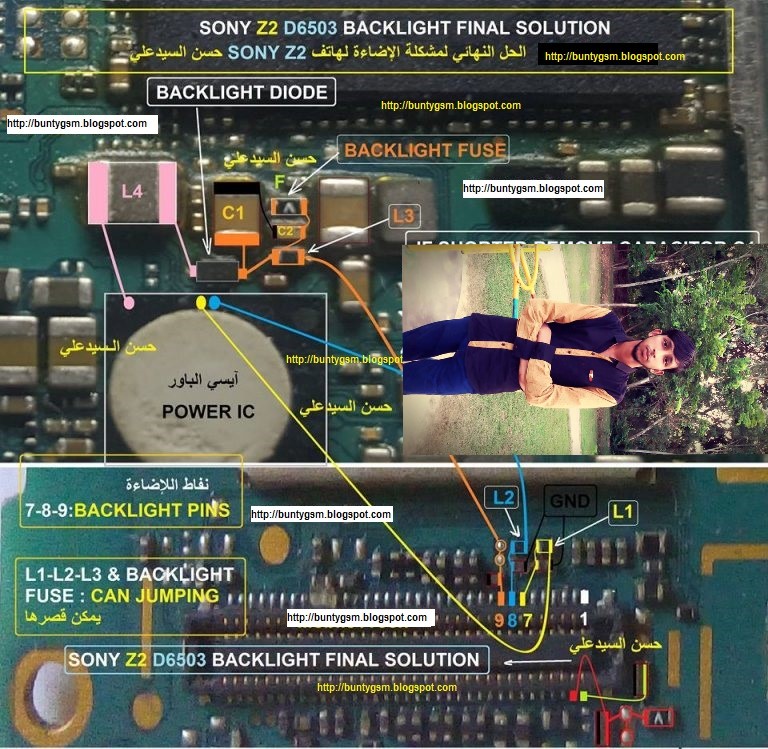
This solution below shows the Sony Xperia Z2 D6503 LCD display backlight components that holds and control for the LCD screen display backlight to glow. If one of these components may become faulty due to wet or water damaged it will result to LCD’s backlight failure.

You may need to trace the connection line tracks, supply voltages and check some of the backlight LED driver components shown on the solution above. You may start to check the highlighted components for it is more prone to be easily damaged when a short circuit occurred. Check and replace if already found damaged.
Solution for Sony D6503 Not working LCD display backlight LED White Display Problem


LG Optimus L3 E400 Display Light Ways Lcd Jumper Solution

LG Optimus L3 E400 Display Light Ways Lcd Jumper Solution
LG Optimus L3 E400, Display, Solution, Jumper, Problem, Ways


Here’s the LG Optimus L3 E400 hardware solution for LCD Display lighting Problem. This problem may result to show a dark or black screen display for there is no illumination backlight LED on the back of the LCD screen.
Problem
Display light / Backlight not working.
Manual Solution
Check your phone brightness settings. (This is the only manual solution for this problem)

Hardware Solution
To fix the dark screen display problem, you may first try to replace or install a new Display screen module, to easily confirm if the LCD’s backlight LED’s were still working or already damaged.
You can also check the LED’s using the multimeter if you can manage without damaging the LCD flex connector.
If the newly installed LCD still shows the same problem and the LED light doesn’t light up, refer to the solution below and locate the highlighted components on the PCB board.


Samsung SM-J120H Not Charging Problem Solution Usb Ways

Samsung SM-J120H Not Charging Problem Solution Usb Ways
Sony Xperia T2 Ultra,Charging,Solution,Jumper,Problem,Ways
Here is the solution for Samsung Galaxy J1 J120H Not Charging problem like there is No Charging indication shows on the display when the battery charger is being plug-in.
This problem is may caused by a faulty charger or a faulty components on Samsung SM-J120H PCB board. This problem may sometimes happens if the device suffered wet or water damaged or just exist.


Before proceeding, ensure that the battery and the battery charger are in good working condition.
– Check all the components shown on the image below, you may start by checking the USB pin connector.
– Then the fuse, diode, capacitors and filter coil for possible open or short circuit.
– Trace each of the connection line paths from USB pins down to the components where it is directly connected


Reasons of Problems
Phone could be water damaged.
Dust particles might be present in charging connector.
Your charger might be faulty.
Connection in the phone might be broken.
Phone is encountered any physical damage.
Any of the capacitors might be faulty.
Charging IC might be faulty. 
Clean dust on charging connector, you can do that simply with the help of a brush.
If same problem replace charging connector and check.
If same problem Check charging connector ways.

If you have further Questions please leave a comment.
Keep in mind:- The every solutions posted on Our website is well tested before by our specialist team, But still we do not take any responsibility for any damage it may cause to your cell phone. Use these repairing solutions at your own Risk, Thank you.


Samsung Galaxy J1 J120H Charging,Jumper,Problem,Ways, solution
Samsung SM-J120H,Charging,Charging Problem,Charging Solution,Charging Jumpers,Charging Ways

Samsung Galaxy A5 A510F Low Signal Problem Solution Jumper Ways

Samsung SM-G530H Ear Speaker Problem Solution Jumper Ways

Friday, 20 January 2017

Samsung SM-G130E Charging Jumper Solution Usb Ways

Samsung SM-G130E Charging Jumper Solution Usb Ways
Samsung G130E Charging Ways Usb Jumper Solution
In Samsung Galaxy Star 2 G130E USB cable connector is also used for charging the phone. Because of excessive use or any other reason USB connector can be damaged.
So if you are experiencing any charging problem or problem connecting your Samsung SM-G130E Charging Ways Solution Usb Jumper to your computer via USB cable then it is possible that your Samsung Galaxy Star 2 G130E charging connector is faulty. Replacing it with a new one is the only solution here. But if by any chance the USB connector prints are broken then you have to make the jumpers as shown in the diagram below.
First check the fuse if open or damaged, second check the diode if shorted. Check the resistor near the power IC. Re-solder or replace if damaged. Trace the VCHARGE (charging voltage) line paths and the ground of the charging pad

Resolving Samsung Galaxy Star 2 G130E charging problem:
Normally Samsung SM-G130E charging problem is due to faulty charging connector, and in order to overcome that, all you have to do is to:
Remove Battery cover, Battery and C cover, then check charging connector’s pins
First Clean and remount all the pins of charging connector.
Put Battery in again and connect charger. Then check the fuse and the and the diode, replace if found damaged.
If you have further questions please don’t hesitate to leave a comment.
Note: Every repairing solution posted here is tested by at least one member of our team. Use the information available here at Your Own Risk. We are not responsible if any harm comes to your device during the repairing process.
Samsung SM-G130E Charging Solution Jumper Problem Ways No Charging Not Supporte

Samsung Galaxy S6 Edge+ G928C Back light Ways Solution Lcd Jumper

n this post, I will answer display-related problems with the Samsung Galaxy S6 Edge Plus G928C. The issues I included here are from our readers. The first one is about the blank screen that started after the phone fell and hit the floor. Common sense would tell us the drop may have messed up the phone and we really don’t know the extent of the damage. If you encountered this kind of problem as well, read on to know what needs to be done.
Display light is also referred to as back light, and is known to be one of the rarest problems that occur with Samsung Galaxy Note.
In the following lines you will get to know the method to resolve Samsung SM-G928C Display Light problem:
Problem
Display light / Back light not working.
Hardware Solution
The very first thing that you need to do is to re-solder all the pins of Note Display on-board connector and check LCD screen.
If the above step fails then check it with a good working LCD screen.
Now check both capacitors (Capacitor 1 and Capacitor 2) with their side’s first pin of display on-board connector. If any of them is faulty, replace them.
Now Check Continuity between +ve terminal of the battery with display IC’s first pin.
Check all the display IC capacitors for continuity, if any of them is faulty then change it.
If the above step fails then gently heat display IC and check, if it still fails then change it.
If everything fails then check with any other good and working LCD Screen.
The above-mentioned steps will surely help you to resolve all of your Nokia 215 Display screen problems, hence allowing you to use your phone flawlessly without any trouble.
Samsung SM-G928C,LCD,Display,Solution,Jumper,Problem,Ways
Samsung Galaxy S6 Edge+ G928C LCD Display Light IC Solution Jumper Problem Ways LCD Display Light Not Working

Samsung Galaxy J2 J200G Power On Off Button Ways Solution Jumper

Samsung Galaxy J2 J200G Power On Off Button Ways Solution Jumper
Samsung SM-GJ200M Power On-Off Button Ways Switch Jumper
Samsung SM-J200G Power Key Jumper On-Off Button Ways Solution
Here’s the jumper ways solution for Samsung Galaxy J2 J200G ON and OFF switch if the handset device showed charging indication when the battery charger is plug-in but unable to power up when the power button is being pressed.
Besides that, a problem in power button might also cause your phone to restart at times, which becomes very much annoying and it troubles you to the masses.
In the following lines you will get to know about Samsung J200G power button problems as well as their solutions:
Workaround
For Samsung Galaxy J2 J200G power button problem there is no work around method, however you can try using a pin and move it all around the Samsung SM-J200G power button, as this might be able to take away some stiffness from your power button

Samsung Galaxy J2 J200G Power Switch Hardware Solution
The two upper or legs of the power switch is connected to the PCB’s ground lines.
The other two which is in lower is the power switch line paths, just locate the test spots as shown on the solution above where to apply a jumper to reconnect it connection.
If you have further questions please don’t hesitate to leave a comment.
Note: Every repairing solution posted here is tested by at least one member of our team. Use the information available here at Your Own Risk. We are not responsible if any harm comes to your device during the repairing process
Samsung SM-J200G,Power Button,Power Key,Power Switch,On Off Button, On Off Switch, Power Problem

Nokia Lumia 635 Mic Problem Repair Solution Microphone Ways

Nokia Lumia 635 Mic Problem Repair Solution Microphone Ways
Nokia Lumia 635 Mic Solution Jumper Problem Ways Mic Not Working Microphone
Today we are going to give in this post, how to fix the mic problem in the hardware of Nokia Lumia 635 by jumper solution. In this type of problem you can hear the voice of others on call, While they aren’t able to hear you.
How to fix the Mic not working problem
Here in below you can see the image, That image says to fix the mic problem. Just you may have to do two Works of your phone hardware area, Then it will work.
Changing Nokia Lumia 635 mic can be a little tricky. It is soldered on the motherboard so if you remove it remember it’s placing position and put the new microphone the same way the old one was. If you have broken prints of the microphone connection points I have marked all of them in the diagram below.
Please Note that we will edit these solutions or add new ones if found in this page at any time in the future. So feel free to come back any time on this page to stay up to date.


Reason for the mic not working problem?
A lot of reasons available for mic not working error come to Nokia Lumia 635 phone. Therefore, we give some main reason for the problem.
Water damage or Water drops going in the phone (moisture)
Throwing On the ground
Christening in tight trousers
Dust going in Mic hole
Mic paths broken or mic area spare parts Being not work
If you have any further Questions please leave a message.
Keep in mind:- The every solutions posted on Our website is well tested before by our specialist team, But still we do not take any responsibility for any damage it may cause to your cell phone. Use these repairing solutions at your own Risk, Thank you.
Nokia Lumia 635 Mic Solution Jumper Problem Ways Mic Not Working Microphone
Nokia 635,Mic,Microphone,Mic Problem,Mic Solution,Mic Jumpers,Mic Ways

Wednesday, 23 November 2016

Sony Xperia T3 D5102 Sim Card Ways Insert Sim Solution

Sony Xperia T3 D5102 Sim Card Ways Insert Sim Solution
Sony Xperia T3 D5102 Sim Card Ways Problem Jumper Solution
Samsung SM-A300 Insert Sim Solution Ways Sim Card Jumper
Here’s a full solution to solved and fix Sony Xperia T3 D5102 with Insert SIM Card Problem. This problem is causing the device not to accept or detect any kind of working SIM card module being inserted to it and it only shows on the display that No sim card inserted or insert sim card.
The solution below shows the Sony Xperia T3 D5102 pin connector connection line paths through to a particular components that holds the SIM card to work. Just refer to the solution to trace each corresponding pin connection for a quick and easy troubleshooting or repair.
First thing you need to do is make sure that just dust or rust is not causing this issue clean the Sony D5102 SIM card connector and check if all the legs are in good shape, if there is any kind of damage to the SIM Card connector replace it with a new one.
Please Note that we will edit these solutions or add new ones if found in this page at any time in the future. So feel free to come back any time on this page to stay up to date.

If you have further questions please don’t hesitate to leave a comment.
Note: Every repairing solution posted here is tested by at least one member of our team. Use the information available here at Your Own Risk. We are not responsible if any harm comes to your device during the repairing process.
Sony Xperia T3 D5102 Insert Sim IC Solution Jumper Problem Ways Sim Not Working Sim Not Valid
Sony D5102 Sim,Insert Sim Problem,Insert Sim Solution,Insert Sim Jumpers,Insert Sim Ways

Samsung SM-G318H Mic Ways Microphone Jumper Solution

Samsung Galaxy Trend 2 Lite SM-G318H Mic Ways Solution Repair Jumper
Samsung Galaxy Trend 2 Lite G318H,Mic,Microphone,Mic Problem,Mic Solution,Mic Jumpers,Mic Ways


In Samsung Galaxy Trend 2 Lite G318H microphone is soldered on the motherboard. Mic is responsible for sending your voice to the person on the other end of a phone call, recording sounds while making videos or simply using voice recording apps. So if the other person can’t listen to your voice during a phone call you are going to have to change the microphone with a new one.
Solution
In order to resolve mic problem all you have to do is to:
Simply reset the phone and verify whether the problem persists or not, you can verify that simply by using the sound recorder.
MIC normally goes mute when calling because of the filter cap over the MIC, it could either be damaged or misaligned.
If changing the filter cap doesn’t work either, than now all you have to do is to move towards the circuit board 


Here some hints on fixing the Samsung SM-G318H MIC problem:
1) Visually check all the highlighted components holds for the microphone, clean using a liquid cleaner kit if an oxidation build up found.
2) Check MIC+ and MIC- connection line track or path for possible open.
3) Check replace the coils, capacitors and resistors connected in the MIC circuit.
4) Replace the microphone module. 
If you have further Questions please leave a comment.
Note: Please note that even though every solution posted on our website is tested by one or more members of our team before posting, but still we do not take any responsibility for any damage it may cause to your cell phones. Use these repairing solutions at your own risk. Thank You.


Samsung SM-G318H Mic Ways Microphone Solution Mic Solution, Microphone Ways, Mic Jumper, Mic Not Working Problem, Repair Microphone Problem In Samsung SM-G318H.